Digital planners offer a modern way for students to manage classes, assignments, and activities. This guide highlights five top options that blend calendar planning, reminders, and often cross-device syncing to help students stay organized without the clutter of paper. Each pick emphasizes a different strength—comprehensive digital calendars, reusable notes, or classroom-focused chore and schedule features—so you can compare styles that fit your study routine and tech preferences.
Summary Table Of Selected Products
| Product | Brand | Key Strengths |
|---|---|---|
| Digital Calendar, Digital Desk Planner with Schedule Reminder | Zovoreminder | 30-year calendar, multiple reminders, icon-based monthly view |
| Rocketbook Flex Reusable Planner | Rocketbook | Reusable pages, cloud syncing, multiple templates |
| 15.6″ Smart Digital Calendar & Chore Chart | flyEVfish | Large touchscreen, family scheduling, meal planning |
| 10.1 Inch Smart Digital Calendar Planner & Chore Chart | moonka | WiFi-enabled, multi-member colors, app and cloud syncing |
| 10.1 Inch Smart Digital Calendar with Chore Charts | YENOCK | Color-coded tasks, cross-platform sync, wall/desk use |
Digital Calendar, Digital Desk Planner With Schedule Reminder

The Zovoreminder digital desk planner emphasizes a long-view calendar with 30 years of planning. This unit provides six reminder types—tasks, work, meetings, birthdays, reminders, and appointments—and stores up to 50 tasks for daily management. While designed as a wall-or-desk calendar, its matrix-like monthly and yearly layout helps students map long-term assignments, exam dates, and project milestones. Note that this product does not sync with mobile devices or external apps, which may influence how you update plans between devices.
Key features include a category-based reminder system, a clear monthly view, and a straightforward approach to avoiding missed deadlines. For students who want a long-term reference that stays put on a desk or wall, this planner offers stable visibility of upcoming academic events without relying on phone apps. The absence of mobile syncing is a consideration if you rely on cloud-based or mobile-only scheduling, but the dedicated reminders and task capacity can be a strong asset for structured study routines.
Rocketbook Flex Reusable Planner
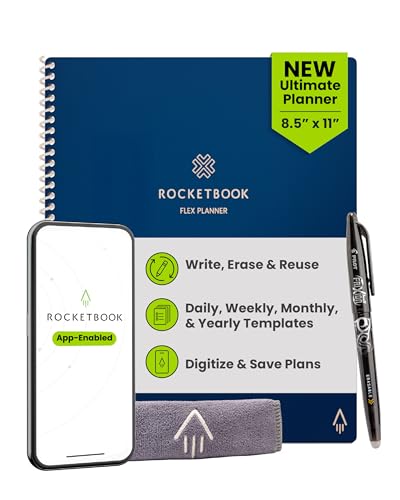
The Rocketbook Flex blends traditional planning with digital conveniences. It includes 48 reusable pages in daily, weekly, monthly, and annual templates alongside lined and dotted layouts for extra notes. The included Pilot Frixion pen enables writing that erases, letting students reuse pages many times over. The Rocketbook app then digitizes handwritten plans and sends them to cloud services such as Google Drive, Dropbox, Evernote, or OneNote. This combination supports both on-paper planning and digital archiving, which is ideal for students who want a tangible planning method that also lives in the cloud.
For students juggling multiple subjects, Rocketbook’s flexible templates support class schedules, weekly goals, daily workloads, and more. The ability to name and search notes through AI-powered organization makes it easier to locate specific assignments or focus areas during study sessions. Because pages are erasable, this option is eco-friendly and cost-efficient over time, especially for learners who prefer a visual, writing-based planning style and value digital backups.
15.6 Inch Smart Digital Calendar & Chore Chart
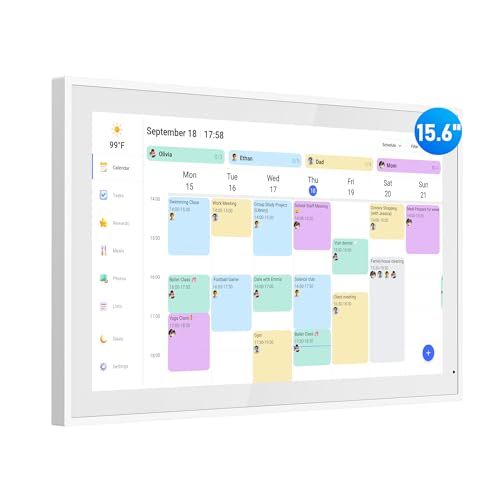
The flyEVfish 15.6″ smart calendar serves as a large, interactive home planner designed for family use. Its color-coded task system helps families assign homework, appointments, and chores to different members, with a built-in meal planning feature broadening its utility beyond academics alone. The wall- or desk-mountable display supports multiple calendar views, and the device includes a user-friendly setup that works with typical home Wi-Fi networks. The enhanced touchscreen provides quick edits and real-time updates across family members, making it suitable for households that need a central planning hub for school-related activities and daily routines.
Important strengths include its expansive screen for legibility, the intuitive color-coding that reduces confusion, and the ability to view meals and schedules in a single interface. The system’s reliance on Wi-Fi connectivity ensures updates propagate to all family members promptly. However, the device is best suited for households that want a dedicated digital hub in a common area, rather than a portable, travel-friendly solution for students who move between classrooms and campuses.
10.1 Inch Smart Digital Calendar Planner & Chore Chart

The moonka 10.1-inch smart digital calendar focuses on family-friendly planning with a strong emphasis on chore charts and cross-device access. It is WiFi-enabled, allowing users to sync across platforms and devices via a dedicated app. The integration with Google Calendar, iCloud, Outlook, Cozi, and Yahoo provides continuity for students who rely on multiple calendars across devices. The device’s color-coded tasks and shared access aim to streamline coordinating school-related activities with family responsibilities, making it useful for students who need consistent visibility of assignments and events at home.
From a user experience perspective, the moonka calendar emphasizes ease of setup, reliable syncing, and clear task categorization. It’s a practical option for homes that want a single hub for school timelines and family life. On the flip side, some users may prefer a portable solution for use on campus rather than a fixed wall or desk device, depending on their study habits and commuting patterns.
10.1 Inch Smart Digital Calendar With Chore Charts
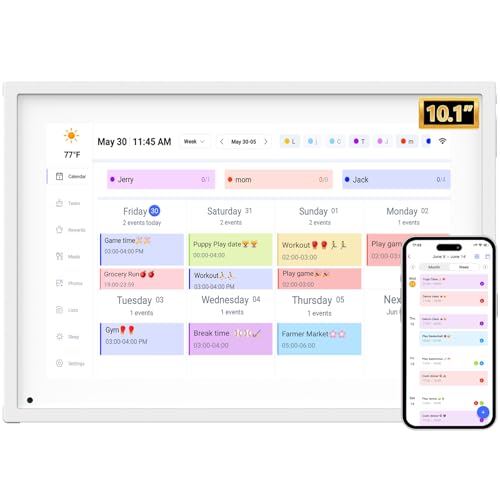
The YENOCK 10.1-inch digital calendar emphasizes color-coded tasks, making it easy for students to assign different colors to classes, assignments, and personal activities. It supports syncing with Google, iCloud, Outlook, Cozi, and Yahoo, aligning with students who use multiple calendars for coursework and extracurriculars. The ultra-clear display aims to reduce visual clutter, and its design supports both wall mounting and desk placement. This option is particularly suitable for students who want a compact, networked calendar that remains accessible from multiple devices and locations.
Buying Guide: Key Considerations For Choosing A Digital Student Planner
- Platform compatibility and syncing: Consider whether you need cross-device access (phone, tablet, laptop) and which calendar ecosystems you already use (Google, iCloud, Outlook, etc.).
- Display size and portability: Larger screens improve readability at home, while compact devices are better for dorms or classrooms. Decide between wall-mounted and desk-friendly options.
- Reminders and task management: Look for systems with multiple reminder types, color-coding, and the ability to handle long-term planning (weeks, months, or years).
- Templates and flexibility: Some planners offer daily/weekly/monthly layouts, chore charts, meal planning, or templates for goals and projects. Choose what best fits your study style.
- Note-taking capabilities: If you prefer handwriting, consider reusable planners (like Rocketbook) or digital notebooks that sync with cloud services for easy organization.
- Durability and longevity: For physical devices, check build quality (cover, page layout, and mounting options). For digital devices, verify firmware updates and warranty coverage.
- Budget and reuse: Reusable options can reduce ongoing costs. Evaluate the total cost of ownership based on page reuse and cloud storage needs.
- Privacy and data handling: If cloud syncing is used, review where data is stored and how it’s protected, particularly for younger students who share devices at home.
In summary, the best digital planners for students combine clear layouts, reliable reminders, and seamless cross-device access. Depending on whether you value long-term planning, reusable note-taking, or a family-focused scheduling hub, one of these five options can align with your study routine and tech ecosystem. Consider your daily workflow, preferred level of digitization, and whether you need on-device editing or cloud-backed storage when making a choice.