Digital planners on tablets blend calendar, meal planning, chore charts, and smart home features into a single hub. This guide highlights five top options designed to streamline family scheduling, meal prep, and daily routines. Each option offers a large touchscreen, multi-calendar syncing, and engaging modes like photo frames and rewards-based chores. Explore key features, and compare how they fit kitchen walls, home offices, or shared living spaces. The table below summarizes each pick to help you decide quickly.
| Product | Brand | Notable Feature |
|---|---|---|
| 10.1″ Digital Calendar | Mezed | App/Touch dual control with photo frame |
| LOOFII 10.1 Inch Smart Calendar | LOOFII | HD display; chore chart & meal planner |
| ApoloSign 21.5″ Digital Calendar | ApoloSign | Dual mode, Google Play, smart home control |
| ApoloSign 15.6″ Digital Calendar | ApoloSign | Dual mode, AI voice assistant |
| 10.1 Inch Smart Digital Calendar | Anyuse | WiFi sync with major calendars; meal planner |
Mezed 10.1″ Digital Calendar & Meal Planner

The Mezed digital calendar combines a family calendar, meal planning, and a built-in photo frame in one 10.1-inch display. With app and touch-screen dual control, it lets you add family members, synchronize calendars, and assign tasks for quick visibility across devices. The 2-in-1 calendar and photo frame mode makes it easy to swap between schedules and memories. Its dedicated meal planner supports weekly or daily menus, enabling pre-planned breakfasts, lunches, and dinners, plus special menus for holidays or anniversaries. This setup suits home offices or shared kitchens where quick glance planning matters.
LOOFII 10.1 Inch Smart Digital Calendar

The LOOFII calendar centers on a 10.1-inch HD display with smart syncing to Google, iCloud, Outlook, and more via the eCalendar App. It also features a switchable digital photo frame for idle moments, letting you display family images in a slideshow. The interactive chore chart and rewards system helps motivate kids to complete tasks while staying organized. This option is ideal for households seeking a modern planner with a social, kid-friendly element and a vibrant, easy-to-read interface.
ApoloSign 21.5″ Digital Calendar

The ApoloSign 21.5-inch calendar delivers a dual-mode experience with Google Play and multi-calendar sync. It acts as a comprehensive planner and family organizer, staying in one place while offering an Android mode to create a dashboard and smart hub. The rewards-first chore chart encourages daily task completion and color-coded to-do lists for groceries or shopping via the companion app. An AI-powered voice assistant and smart home control let users set alarms, check weather, and manage tasks through voice commands, making it a central command center for busy families.
ApoloSign 15.6″ Digital Calendar (Teak)

This 15.6-inch dual-mode calendar emphasizes calendar and planner functions with auto-sync across Google, Outlook, iCloud, and more. It includes a rewards-based chore chart and routine planner to help kids build good habits, alongside color-coded to-do lists for shopping or wish lists via the mobile app. Its built-in AI voice assistant and smart home control, featuring Google Gemini AI, enable hands-free use and integration with Google Home for devices like doorbells and cameras, all accessible from a single screen.
ApoloSign 15.6″ Digital Calendar (Gray Wood)

Similar to the teak variant, this gray wood edition offers dual-mode functionality with Auto Sync across major calendars. It emphasizes a chore chart and routine planner to foster consistent habits, plus color-coded to-do lists via the mobile app. The experience is reinforced by an AI voice assistant and smart home control, with four built-in microphones for voice commands. The calendar is designed to work as a central family hub, supporting daily planning and integration with smart devices for a connected home.
Anyuse 10.1 Inch Smart Digital Calendar
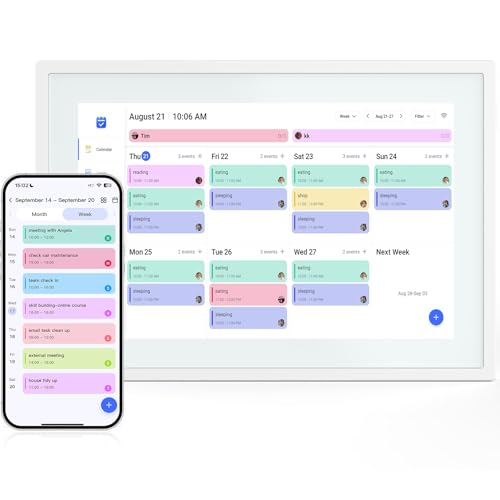
The Anyuse 10.1-inch calendar combines a touchscreen planner, chore chart, and meal scheduler into a WiFi-connected system. It syncs instantly with Google Calendar, iCloud, Outlook, Cozi, and Yahoo, ensuring everyone stays on the same page. Events can be added directly on the device or via the companion app. A vibrant HD IPS screen provides clear visibility from various angles, and the desktop stand supports both portrait and landscape orientations, making it adaptable to different spaces such as kitchens, desks, or living areas.
Buying Guide: Key Purchase Considerations
- Screen size and layout: Choose a size that fits your space and provides readable text for all family members. Larger screens are great for shared kitchens or workspaces, while 10–11 inch models suit desk setups.
- Calendar syncing: Ensure the device supports Google Calendar, iCloud, Outlook, Cozi, and other services you rely on. Real-time syncing and offline access can be crucial for households with spotty internet.
- Chore charts and meal planning: Look for built-in chore trackers and meal planners that let you assign tasks, set rewards, and schedule meals across days or weeks.
- Smart home integration: Some models offer AI voice assistants and smart home control. If you have a Google Home or similar ecosystem, verify compatibility and voice features.
- Photo frame mode: A 2-in-1 calendar and photo frame can help keep memories visible. Check image transfer methods, cloud sync support, and slideshow options.
- User profiles and sharing: Multi-user support allows different family members to have personal calendars, tasks, and reminders. Consider parental controls where appropriate.
- Hardware durability and mounting options: Wall mounting or desk stand compatibility, as well as heat management and power requirements, impact long-term use.
- App ecosystem and updates: Regular firmware/app updates extend functionality and fix issues. Verify the vendor’s support and upgrade path.
How To Choose The Right Digital Calendar For Your Home
Start by mapping your daily routines and identifying which features matter most: calendar accuracy, meal planning, and reward-based chores. If you need a central hub with voice commands, prioritize models with AI assistants and smart home integration. For households with kids, a visually engaging chore chart and photo-frame mode can improve engagement. Consider space constraints and whether you want wall-mounted or desk-stand configurations. Finally, evaluate the ease of use, app quality, and cross-device syncing to ensure everyone in the family uses the calendar effectively.